
Why IPTV Channels Freeze at Night
If your IPTV is smooth at midday and unwatchable at 9pm, the first suspicion is usually your own connection dying exactly when you sit down. In most cases that is not what happens. Evenings are when every IPTV viewer on the network gets home at the same time, and the service — any IPTV service — has to serve all of them at once. Here is what is actually going on and how to tell the difference.
Why evenings are the worst hour for IPTV
Three things peak at the same time. First, simultaneous viewers: the number of households streaming live TV at once is highest between roughly 7pm and 11pm, because that is when people are home, awake and settled on the couch. Second, the same channels: peak audiences crowd onto a small number of popular channels and big live events, so the load is not spread evenly across the library — it piles onto exactly the streams you are watching. Third, bitrate: prime-time content is where 4K streams, premium sports and PPV events live, and a 4K stream needs several times the bandwidth of an SD one.
None of this makes evenings broken. It makes evenings the stress test. A service that holds up at prime time will hold up all day; a service that degrades at prime time is telling you where its real limits are.
What evening freezing usually is not
It is worth ruling out the common misdiagnoses before changing anything. The app did not break at 8pm — no update ships on a schedule like that. Your Firestick did not suddenly lose Wi-Fi — if the connection had died, nothing would load at all, including the menu that is still working. And your internet plan did not change — your contracted speed is what it was at noon. What changes is how much of that speed, and how much server capacity, you actually get when everyone else wants it too.
How to tell your connection from provider overload
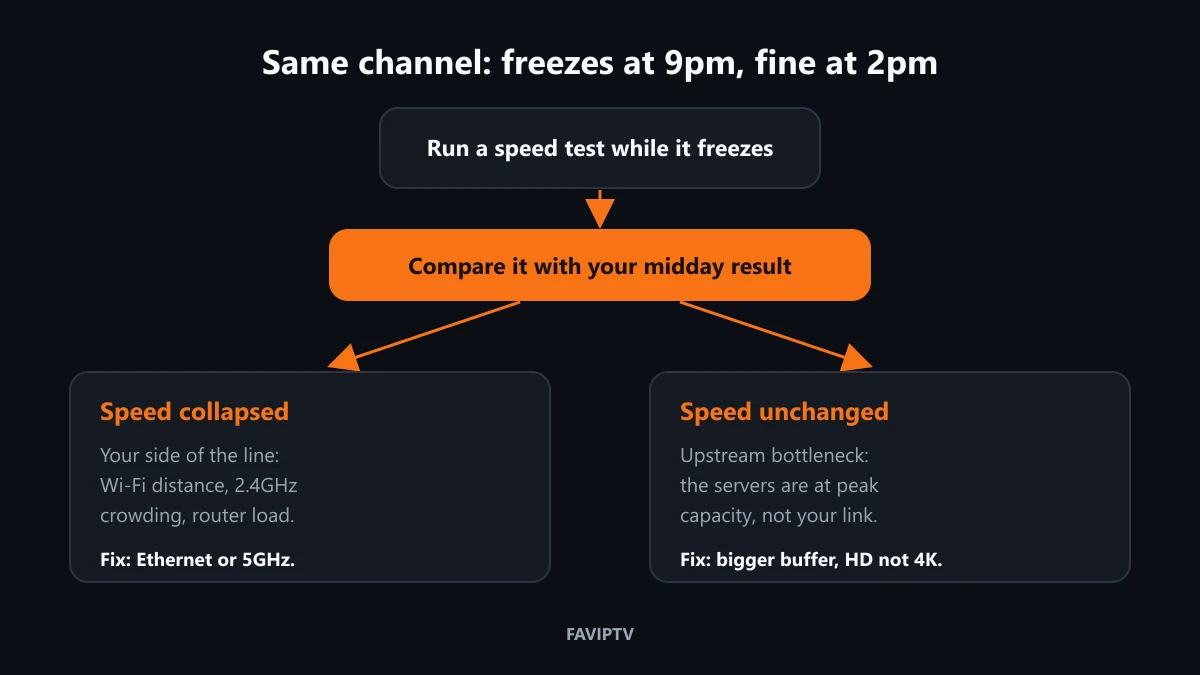
This is the one diagnostic that matters, and it takes ninety seconds. When the stream freezes in the evening, run a speed test on the same device. If your speed has collapsed compared with lunchtime, the problem is on your side of the connection — usually Wi-Fi distance, a crowded 2.4GHz band, or a router that is struggling. If your speed is unchanged but the stream still freezes, the bottleneck is upstream of you: the server is saturated at peak hour.
That distinction changes what you should do. No setting inside the app can fix a saturated server, and no amount of support-ticketing can fix a weak Wi-Fi signal. Attack the side the test points at.
What genuinely helps at prime time
Get the device off Wi-Fi if you can. A £10 Ethernet adapter on a Firestick removes the single biggest variable in evening buffering. If that is not an option, move to the 5GHz band and closer to the router; a Wi-Fi signal that reads “good” on paper can still jitter badly under evening load from every device in the house.
Raise the buffer. In TiviMate, a 10–15 second buffer trades a slightly later start for much smoother prime-time playback. In IPTV Smarters Pro, the equivalent setting is under playback options. A longer buffer rides out the short (1–3 second) dips that peak-hour congestion causes, which are exactly the dips you notice.
Drop 4K to HD on busy evenings. A 4K stream at peak time competes with thousands of other 4K streams. The HD version of the same channel is often perfectly stable while the 4K version freezes — the picture is slightly softer, but a stable 1080p beats a freezing 4K. Most players let you switch quality from the playback menu without restarting the channel.
Test the same channel at 2pm. This is the peace-of-mind test: if the channel that froze at 9pm plays flawlessly at 2pm on identical settings, you have proven peak-hour congestion rather than a broken setup. Screenshot both results and send them to support — they turn a vague complaint into a diagnosis.
When evening freezing means you should switch
Occasional prime-time dips are normal for every provider. What is not normal is a service that freezes several times every evening on a fast, stable connection with a large buffer — that is a provider whose capacity does not cover its own peak audience, and no fix on your side will cure it. Our checklist for choosing a service covers how to test this properly, and the free 24-hour trial lets you run the 2pm vs 9pm test on a new provider before paying anything. For the general causes and fixes, our IPTV buffering guide remains the main reference.
Sources: Internet Protocol television (Wikipedia).

How we test and review
Every guide on this blog is checked against the current versions of the apps and devices it covers, and pricing figures come from our live service data. Comparisons are verified with a real account through the free 24-hour trial before a recommendation is made. When an app changes its setup flow, we revise the guide instead of leaving stale steps in place, and the date at the top of each post shows when it was published.