
IPTV Smarters Pro on Firestick: Install Guide
IPTV Smarters Pro is the most popular IPTV player on Firestick, and it is not in the Amazon Appstore. That surprises everyone the first time: there is no “install” button. You sideload it with a free app called Downloader. This post takes you through the whole process, from a blank Firestick to watching channels, plus the two errors that stop most people.
Check your Fire TV model first
Not every Firestick can install this app any more. Three devices currently on sale — the Fire TV Stick 4K Select (2025), the 2026 Fire TV Stick HD and the 3rd-gen Fire TV Stick 4K (2026) — run Vega OS, Amazon’s Linux-based system. Vega OS has no “install unknown apps” toggle, no Downloader and no way to run Android APKs, so IPTV Smarters Pro cannot be installed on them at all. It is not a missing setting and there is no workaround.
Open Settings → My Fire TV → About and read the device name. If it says 4K Max, 4K Plus, an older 4K, Lite, Fire TV Cube or a Fire TV, you are on Fire OS and everything below works. If it says 4K Select, or the model is a 2026 Stick HD or a 2026 3rd-gen 4K, stop here and check our Fire TV compatibility table — or message support on WhatsApp at +212 653 362 639 before buying anything.
Step 1: Prepare the Firestick
Before sideloading anything, Amazon requires permission. Go to Settings → My Fire TV → Developer Options and turn on ADB debugging. If Developer Options is missing, open Settings → My Fire TV → About, highlight the device name and press the remote’s select button about seven times until a message confirms Developer Options is enabled.
Next, install Downloader from the Amazon Appstore — that one is in the store. Open Downloader, allow it storage access when asked, and accept the on-screen prompts.
Step 2: Download IPTV Smarters Pro
In Downloader’s URL field, type the short address firesticktricks.com/smarter (Downloader resolves it to the current official APK) and open it. The download starts automatically. When it finishes, tap Install, then Open.
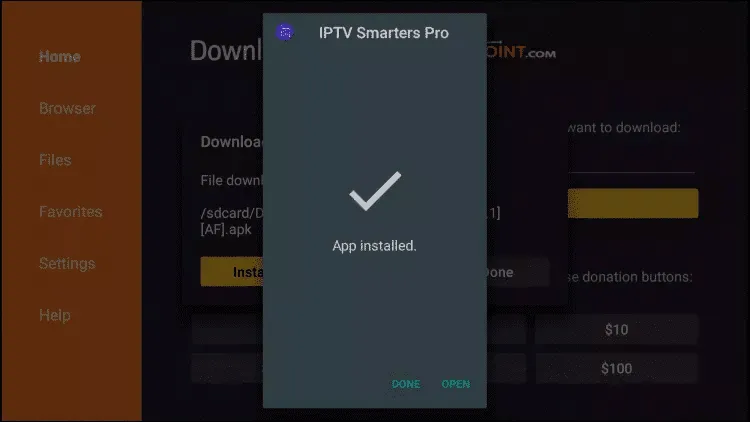
A note of caution: only download the APK this way, from the address above or from the developer’s site. IPTV player clones carrying malware circulate in search results — the genuine app is signed by the developer and never asks for a setup fee.
Step 3: Sign in with your subscription
Choose Login with Xtream Codes API and enter your server URL exactly as received — including the port number — then your username and password. Tap Login and wait. The first load pulls channels, the movie and series library and the EPG, which takes a few minutes on the first run. After that it updates in the background.
If you received an M3U playlist link instead, choose Login with M3U Playlist and paste the link. Both logins produce the same content; Xtream Codes additionally syncs your account details, which is how the app knows your subscription expiry.
Step 4: Set the EPG to update overnight
In Settings, find the EPG update interval and set it for the hours you sleep. A guide refresh during a film is the main cause of the micro-freezes people blame on “the server”. While you are there, turn on Hardware decoder if you see green or pink lines on 4K channels, and set the buffer to at least 10 seconds.
The two errors that stop everyone
“App not installed” after downloading: the previous version is in the way. Uninstall the old IPTV Smarters Pro from Settings → Applications → Manage Installed Applications, then install the new APK again.
Login spins forever: the server URL is wrong — usually a missing port or a trailing space copied from the email. Re-type it by hand, restart the Firestick, and try once more. If it still fails, your subscription details, not the app, are the problem; contact support on WhatsApp at +212 653 362 639 with a screenshot of the login screen.
New to IPTV players altogether? Our IPTV Smarters Pro vs TiviMate comparison explains the trade-offs, and the free 24-hour trial gives you a login to practise with before you pay for anything. The device-by-device version of this guide lives on our Firestick setup page.
Sources: IPTV Smarters Pro (official site) · Fire OS overview (Amazon Developer) · AFTVnews: Fire TV models without sideloading.

How we test and review
Every guide on this blog is checked against the current versions of the apps and devices it covers, and pricing figures come from our live service data. Comparisons are verified with a real account through the free 24-hour trial before a recommendation is made. When an app changes its setup flow, we revise the guide instead of leaving stale steps in place, and the date at the top of each post shows when it was published.